Problem
Non-admin users receive the following OAuth Error when logging in to Salesforce Integration. Login Salesforce > browser tab opens for cloud8.8x8.com > OAUTH_APPROVAL_ERROR_GENERIC 8x8 Panel opens but shows "Reconnecting to Salesforce..."
?sv=2026-02-06&spr=https&st=2026-11-03T21%3A55%3A21Z&se=2026-11-03T22%3A06%3A21Z&sr=c&sp=r&sig=HoAtATrwsLio45ZkXF2Voi1Db5aRzrfQckM2QETgFYI%3D "Salesforce.png")
Solution
Install the ‘MaestroInt’ app from Connected Apps OAuth Usage in Setup. Usage restrictions can block access to uninstalled connected apps. Admins must find which uninstalled apps are in use, and decide if they’re trusted and should be installed, or block them if they’re not. To install the MaestroInt app:
In the SalesforceSetup, search for Connected Apps OAuth Usage and select it from the list of results.
Locate the MaestroInt app in the list.
Check if the MaestroInt app displays the Install button in the Action column. This indicates that the app is not installed.
Click Install.
.png?sv=2026-02-06&spr=https&st=2026-11-03T21%3A55%3A21Z&se=2026-11-03T22%3A06%3A21Z&sr=c&sp=r&sig=HoAtATrwsLio45ZkXF2Voi1Db5aRzrfQckM2QETgFYI%3D)
From the confirmation page, select Install.
After the MaestroInt app is successfully installed, click Manage App Policies.
.png?sv=2026-02-06&spr=https&st=2026-11-03T21%3A55%3A21Z&se=2026-11-03T22%3A06%3A21Z&sr=c&sp=r&sig=HoAtATrwsLio45ZkXF2Voi1Db5aRzrfQckM2QETgFYI%3D)
Click Edit Policies.
From the OAuth Policies section, click the Permitted Users dropdown menu and select one of the following options:
All users may self-authorize (Default): Allows anyone in the org to authorize the app after signing in for the first time.
Admin-approved users are pre-authorized: Allows only users with specific profiles or permission sets to access without authorizing. For this option, you must manage profiles for the app by editing each profile’s Connected App Access list. You can also manage permission sets for the app by editing each permission set’s Assigned Connected App list.
.png?sv=2026-02-06&spr=https&st=2026-11-03T21%3A55%3A21Z&se=2026-11-03T22%3A06%3A21Z&sr=c&sp=r&sig=HoAtATrwsLio45ZkXF2Voi1Db5aRzrfQckM2QETgFYI%3D)
Click Save.
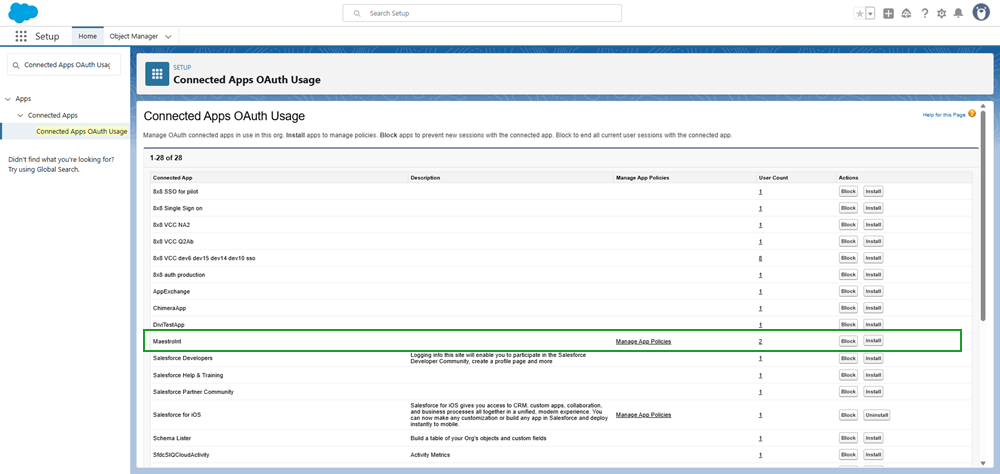
?sv=2026-02-06&spr=https&st=2026-11-03T21%3A55%3A21Z&se=2026-11-03T22%3A06%3A21Z&sr=c&sp=r&sig=HoAtATrwsLio45ZkXF2Voi1Db5aRzrfQckM2QETgFYI%3D "apps-install-block.png")
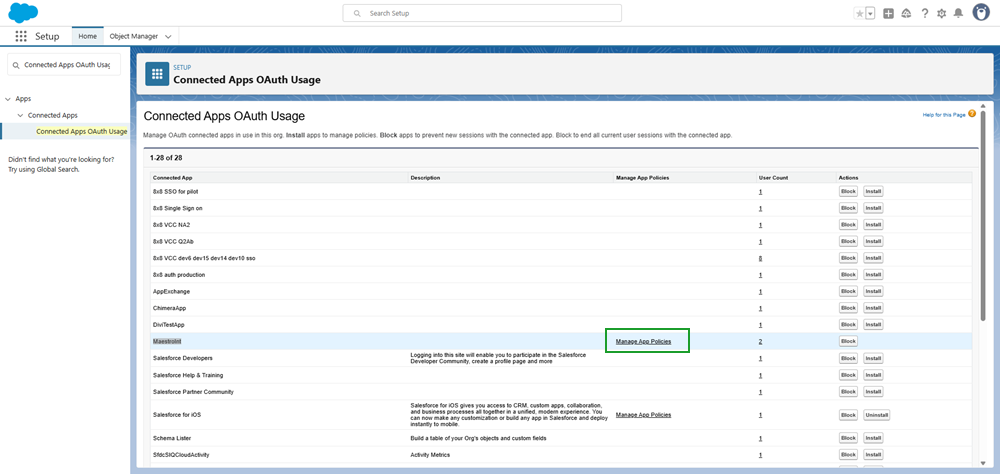
?sv=2026-02-06&spr=https&st=2026-11-03T21%3A55%3A21Z&se=2026-11-03T22%3A06%3A21Z&sr=c&sp=r&sig=HoAtATrwsLio45ZkXF2Voi1Db5aRzrfQckM2QETgFYI%3D "manage-app-policies.png")
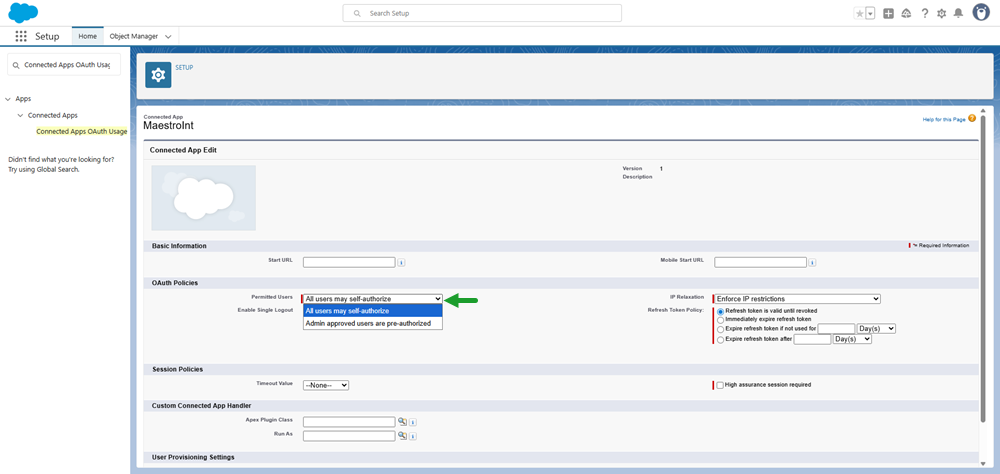
?sv=2026-02-06&spr=https&st=2026-11-03T21%3A55%3A21Z&se=2026-11-03T22%3A06%3A21Z&sr=c&sp=r&sig=HoAtATrwsLio45ZkXF2Voi1Db5aRzrfQckM2QETgFYI%3D "maestroint-permitted-users.png")
Reason
Salesforce has restricted the use of uninstalled connected apps. This usage restriction will block end users from using uninstalled connected apps.